Customer Case Portfolio · Investment · Finance

Semi-annual portfolio reporting,
aggregated by an agent

AgentV is an AI agent that automates the entire portfolio-reporting cycle for venture capital firm Translink Investment. Managing the company roster → preparing report templates → sending request emails → tracking replies and reminders → aggregating financial documents → building the master summary — all executed unattended with Google Workspace and LLMs.

🏢 Translink Investment 👥 Fund team · deal partners ✅ Live (agentv.popupstudio.ai)
65 companies
11–15 min
Quarterly report sheets auto-generated in bulk
24/7 unattendedReply detection and no-reply reminders, automated
5 doc typesFinancial documents auto-classified and keyed in
Half-year cycleThe whole process as a single flow
The Challenge

The manual work that repeated every half-year

Collecting and verifying the reports of dozens of portfolio companies was mostly done by hand.

1

Building each company's report tab by hand

Opening each portfolio company's spreadsheet, creating a new quarterly tab, and aligning formats and reference dates — over and over. For new investees with no prior sheet, the "clone and patch" approach broke down.

2

Sending request emails to every company individually

Different bodies for domestic vs. Korea-rep categories, each with a company-specific spreadsheet link and CC added by hand. Afterward, someone had to remember and manage each thread to track replies.

3

Reply checks and reminders, all manual

Who had responded, and who needed a nudge — the owner had to check the inbox with their own eyes.

4

Classifying financial docs and extracting figures by hand

Someone had to identify document types like financial statements, shareholder registers, and corporate registries, then manually copy figures such as revenue, operating profit, and shares outstanding into the master summary.

The Solution

Report aggregation as one pipeline

AgentV links the semi-annual reporting work into a 6-step pipeline, and the scheduler runs reply tracking and reminders unattended.

STEP 1

Manage roster

Reads the spreadsheet roster and registers it as the reference data for every function.

STEP 2

Prepare templates

Copies the quarterly sheet from a central template to each company.

STEP 3

Request emails

Auto-sends with category-specific body + company link.

STEP 4

Reply check · reminders

Detects replies via Gmail threads, auto-nudges non-responders.

STEP 5

Aggregate · summary

Vision AI classifies attachments and financials, updating the master summary.

Feature ① · Starting point

Connect the company roster

Connect the portfolio company roster you already use (a Google Sheet) as-is, and every downstream automation runs off of it. The owner just keeps the roster up to date.

  • Connect your existing roster sheet as-is — no re-entering
  • Add or change a company, and one reconnect reflects it
  • The connected roster becomes the reference for every function, so the flow never breaks
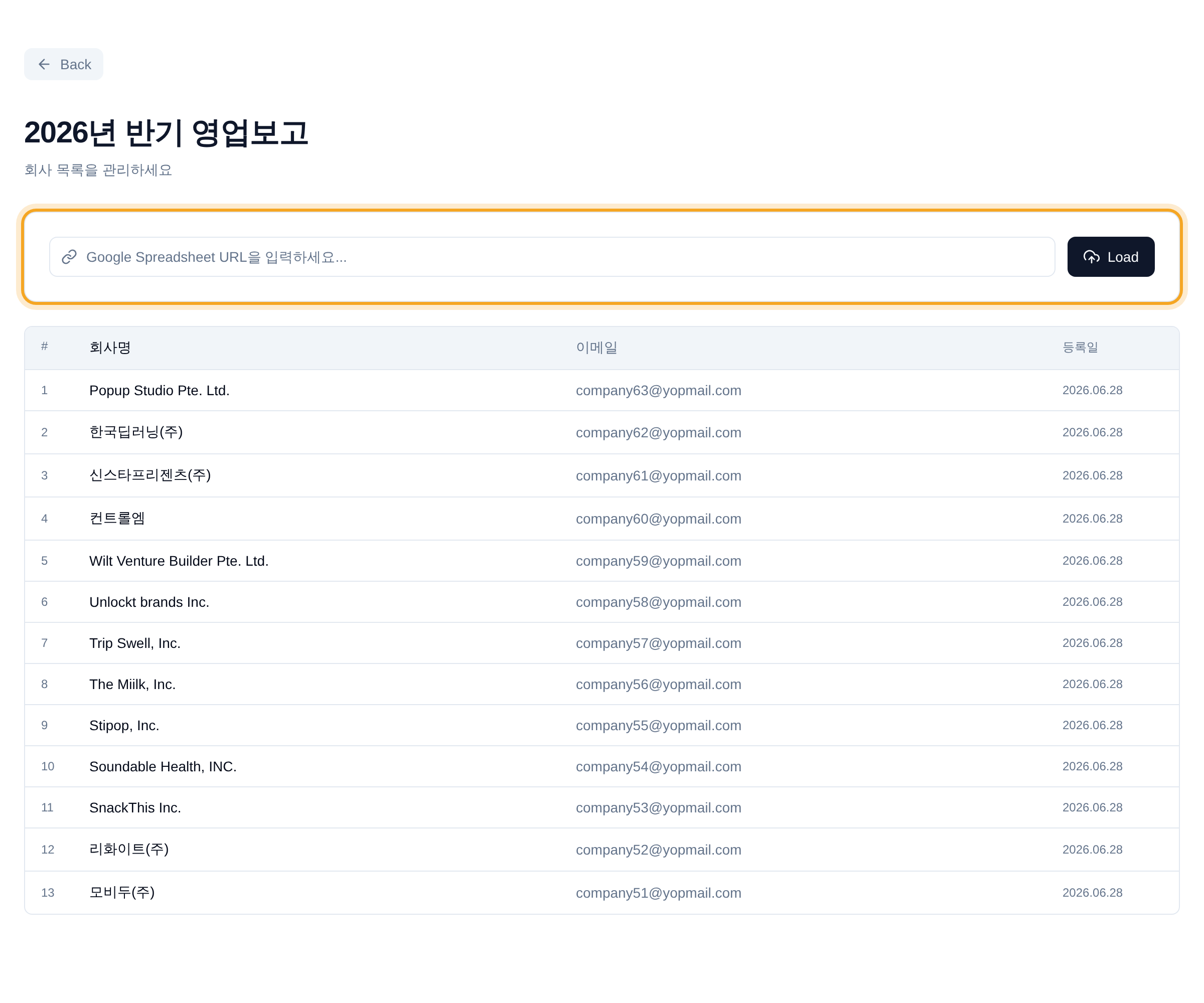
Roster management screen — loaded list of portfolio companies
Portfolio companies registered from a single spreadsheet
Feature ② · Core

Report templates prepared automatically

One button and this quarter's report template is created automatically in each of dozens of companies' spreadsheets. No opening each company's sheet to make a new tab.

  • Dozens of companies' quarterly templates prepared at once, in minutes
  • Even new investees reporting for the first time are generated without omission
  • See each company's done / in-progress / pending status in real time
  • Stops mid-run? Safely resume where it left off
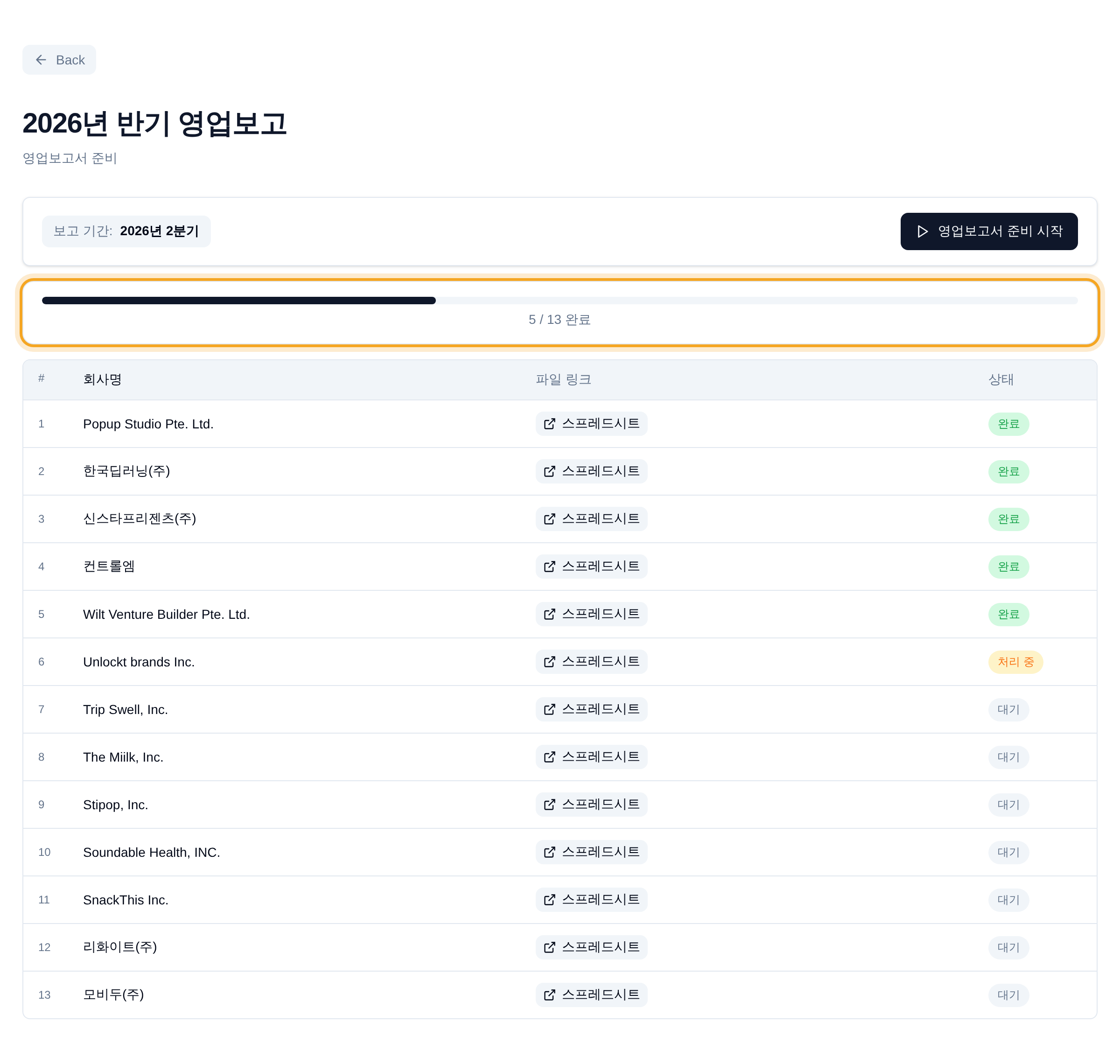
Report preparation screen — per-company progress and completion status
Per-company sheet-creation progress · done / in-progress / pending status
Feature ③

Request emails sent automatically

The right message is auto-selected for each company, with its dedicated sheet link inserted, and sent at once. The owner just previews the actual outgoing mail before sending.

  • Fills in the right message and dedicated link per company type
  • Preview the actual email before sending
  • Send to only the companies you choose
  • Overseas companies that don't need one are excluded automatically
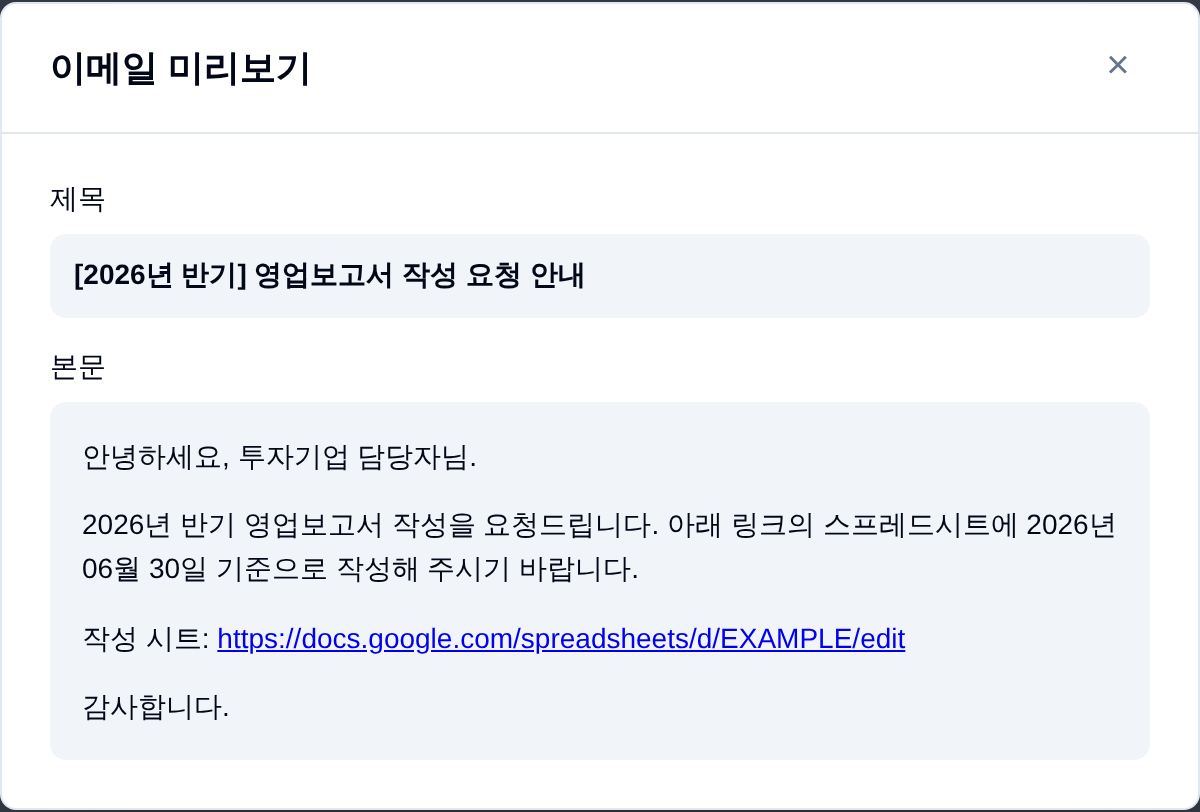
Request email preview modal
Preview subject, body, and per-company link before sending
Feature ④ · Automatic

Reply checks · reminders

No need to dig through the inbox to see who replied — it's checked automatically, and which documents arrived is laid out per company in a table. Companies that haven't sent yet get a nudge on their own.

  • Reply status tallied automatically, without anyone checking
  • See at a glance which of the 5 doc types (financial statements · income statement · shareholder register · 4 social insurances · corporate registry) each company sent
  • Reminder emails auto-sent to non-responders
  • Results fill into the master summary automatically
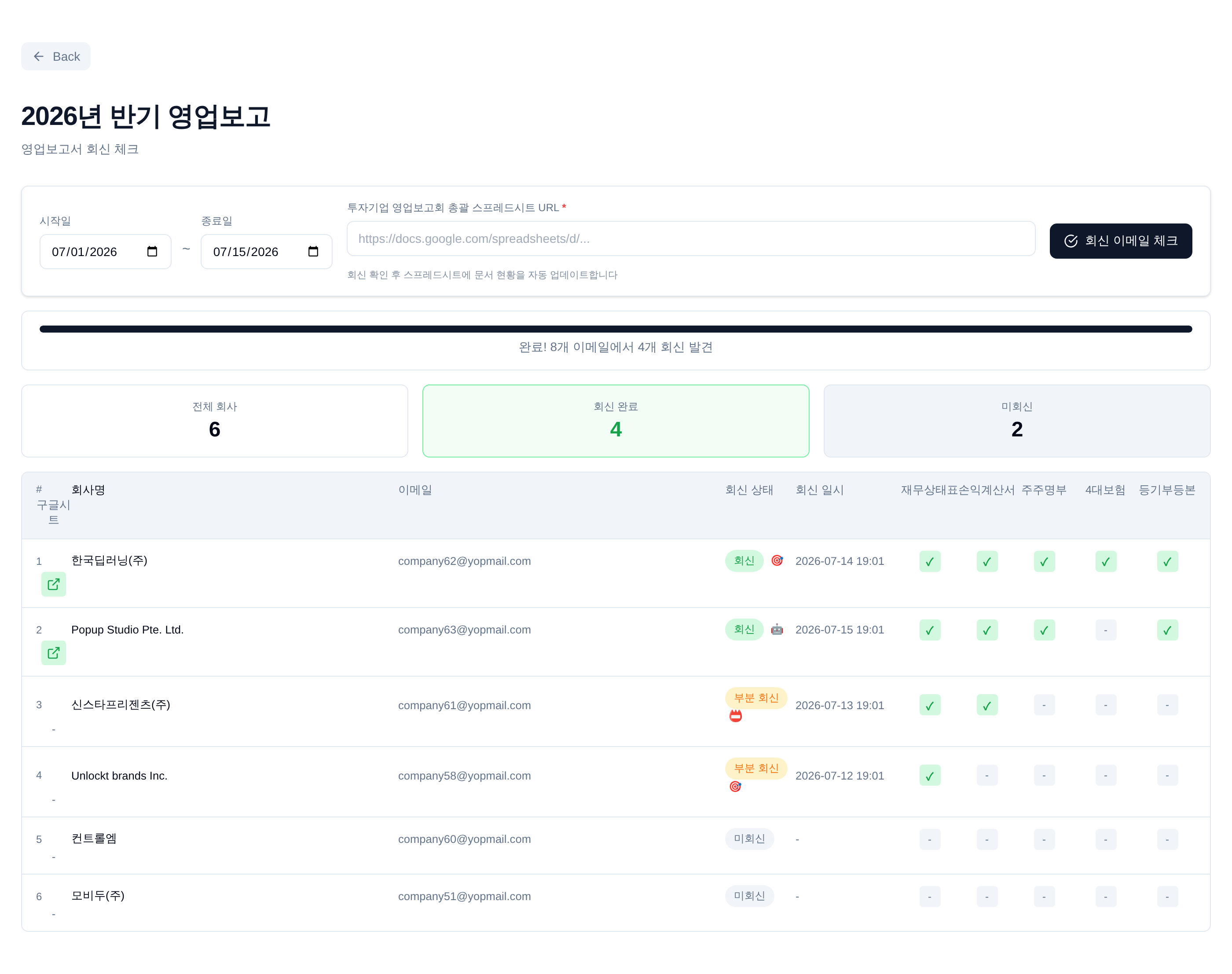
Reply-check results — per-company document arrival table
Per-company reply status · arrival of all 5 document types tallied automatically
Feature ⑤ · AI reading

Aggregate financials · build the master summary

Upload the financial statements, income statements, and corporate registries companies send in, and AI figures out the document type on its own and pulls numbers like revenue, operating profit, and shares outstanding to fill the master summary. No more copying figures by hand.

  • Upload a file and the needed financial figures are read out automatically
  • Distinguishes document types — financial statements, income statements, corporate registries, and more
  • Upload the same file twice and it's deduplicated cleanly
  • The manual transcription of numbers disappears
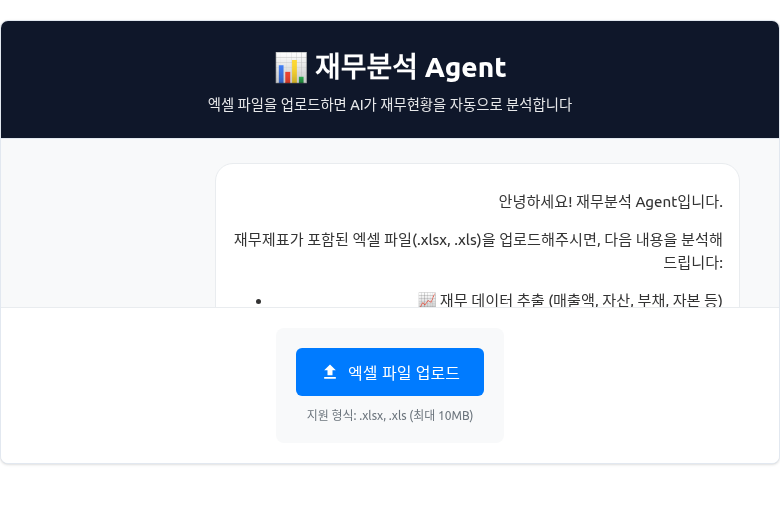
Financial analysis Agent — automatic extraction of financial data after Excel upload
One Excel upload, financial status analyzed automatically
"We no longer need to watch the inbox."

Sending, reply detection, and reminders run around the clock on the scheduler, so the owner just checks the results.

The Impact

The scheduler holds the post a person used to

Repetitive work and wait time are removed, and people focus on the judgment-heavy review.

BEFORE
  • Opening each company's spreadsheet to build quarterly tabs by hand
  • Writing and sending category emails one by one
  • Checking replies by eye in the inbox
  • Identifying financial-doc types and transcribing figures by hand
AFTER
  • 65 companies' quarterly sheets generated unattended in 11–15 min
  • Auto-send with category-specific body and links (selective sending supported)
  • Reply detection and reminders run unattended every 30 / 35 min
  • Vision AI classifies and extracts from all 5 portfolio document types
Scale

Dozens of companies' half-year reporting in one flow

A single roster registration links sheet prep, request emails, reply tracking, and the master summary into one pipeline. An idempotent design — just re-run the companies that failed — keeps operational load low.

Unattended operation
24/7

Reply detection and reminders run around the clock without anyone present. The owner never watches the inbox — they just check the organized results.

Tech Stack

Built on a proven stack

Uses the Brie common stack as-is, sharing parts and people with other FDE projects.

Django 4.2 Django REST Framework PostgreSQL LangGraph · LangChain GPT-4o (routing) Claude Vision (document parsing) Gmail · Sheets · Docs · Drive API Tavily (news search) django-crontab · Huey Vanilla HTML/CSS/JS