Customer Case Portfolio · Commerce

Group-buy settlement,
done in a few clicks and an upload

We automated seller settlement for influencer group-buy vendor Wooha Company. Registering seller info → tallying sales quantities from settlement statements → dispatching each seller's statement — work that took hours by hand for hundreds of sellers now takes seconds to minutes.

🏢 Wooha Company (influencer group-buy) 👥 Settlement staff ✅ Live
2–3 hrs
→ 30 sec
Processing 100 sellers' settlement statements
3–4 hrs
→ 2–3 min
Dispatching 100 sellers' statements
~99%Time saved on repetitive settlement work
Every monthThe whole settlement process, automated
The Challenge

The hands-on settlement that came around every month

As suppliers and sellers grew, so did the settlement team's repetitive manual work.

1

Every settlement statement in a different format

Each supplier and platform used a different file format, and even the same product had different option labels — so the owner had to cross-check by eye "which seller's which option is this" and transcribe quantities one by one.

2

Building each seller's statement and sending individually

Building a statement per seller, capturing or copying it, and sending it one at a time over KakaoTalk. With dozens or hundreds of sellers, sending alone took hours.

3

Typing seller info straight into the sheet

Entering names, accounts, and business numbers directly into spreadsheet cells made it easy to put values in the wrong cell or overwrite existing ones.

The Solution

The 3 settlement steps, automated as-is

The exact order the staff already followed — register sellers → process statements → dispatch statements — turned into uploading a file and pressing a button on the web.

STEP 1

Register seller info

Fill in the form and it's recorded accurately into the master sheet.

STEP 2

Process statements

Upload files and quantities are keyed in per seller and option.

STEP 3

Dispatch statements

Each seller's statement is auto-generated and sent in bulk.

Feature ① · Starting point

Register seller info in one go

Enter a new seller's name, account, and business number in the web form and press "Register," and it's recorded to the exact position in the master group-buy sheet. No opening the spreadsheet to hunt for a cell.

  • Just fill the form — no finding cells in the sheet
  • Required-field and account re-check block typos and omissions
  • Handles resident / business numbers automatically for individuals vs. businesses
  • 3–5 min per seller → about 1 min
InputSeller name · account · business number
Auto-validateRequired fields · account re-check
Auto-recordEntered accurately into the master sheet's seller info
Form input → validation → auto-recorded to sheet
Feature ② · Core

Upload a statement, sales quantities keyed in automatically

Upload the settlement files (Excel · PDF) from suppliers all at once, press "Start processing," and it reads each file for per-seller, per-option sales quantities and fills the right cells in the master sheet automatically.

  • Even when file and sheet option labels differ, they're matched as the same option
  • Matches even when seller names differ slightly (e.g., "Chacha" ↔ "Chacha♡")
  • Processes files from multiple platforms at once; if one fails, the rest continue
  • Never touches already-filled cells, so no overwrite worries
  • 100 sellers, 2–3 hours → about 30 seconds
Upload settlement filesMultiple Excel · PDF per supplier
AI matchingAuto cross-check seller and option names
Auto-fill + verifyMaster sheet quantities filled · totals reconciled
Upload files → AI matches sellers and options → quantities keyed in automatically
Feature ③

Auto-generate statements + bulk email dispatch

Pick the settlement month and press the button, and each seller's statement is auto-generated in the same format, saved to the monthly Drive folder, and emailed to every seller at once.

  • What used to be a per-seller file sent over KakaoTalk, now done all at once
  • Every statement in the same format — clean to send to sellers
  • Auto-organized by month in Drive → easy to look up past settlement history
  • Sellers with no payout are excluded automatically; dispatch results checked per seller
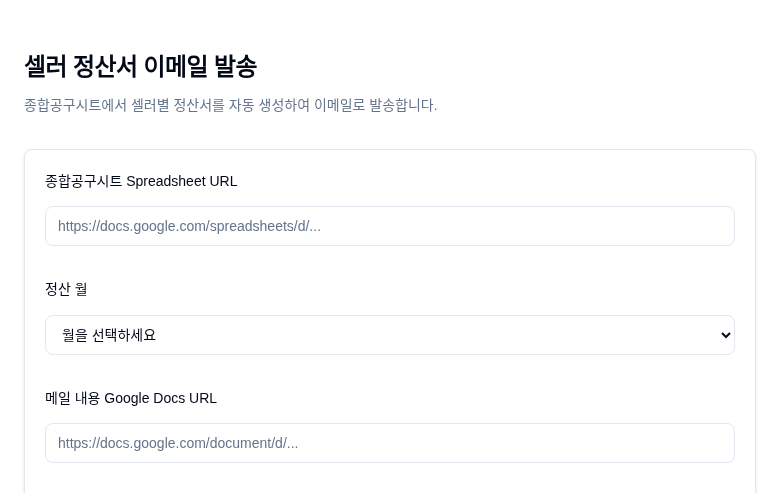
Seller settlement email dispatch screen — sheet URL, settlement month, and email content input
Just pick the settlement month to generate and dispatch each seller's statement
"We want to maximize revenue with a small team."

The goal was to automate repetitive work like settlement, so a small team can handle more sellers and revenue.
Seen in data

The settlement flow in real data

From the settlement statement suppliers send in (input) to the statement that goes out to sellers (output), here's a real processing example. (Sensitive info like accounts and resident numbers is masked; based on sample / dev data.)

Input
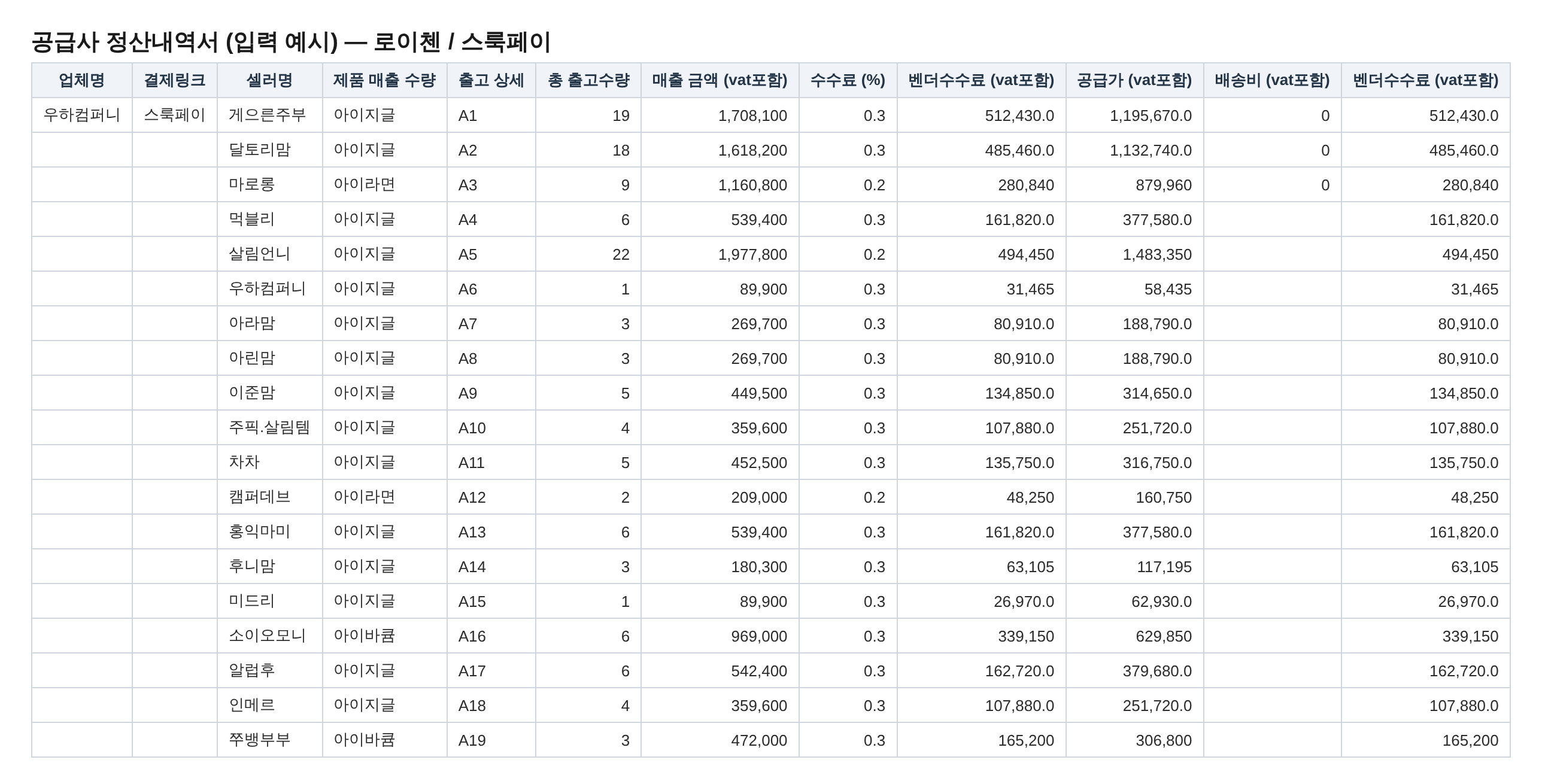
Supplier settlement statement input example — per-seller shipped quantity, revenue, commission
① The settlement statement suppliers send in — the format and option labels differ across every platform and supplier.
Reference data
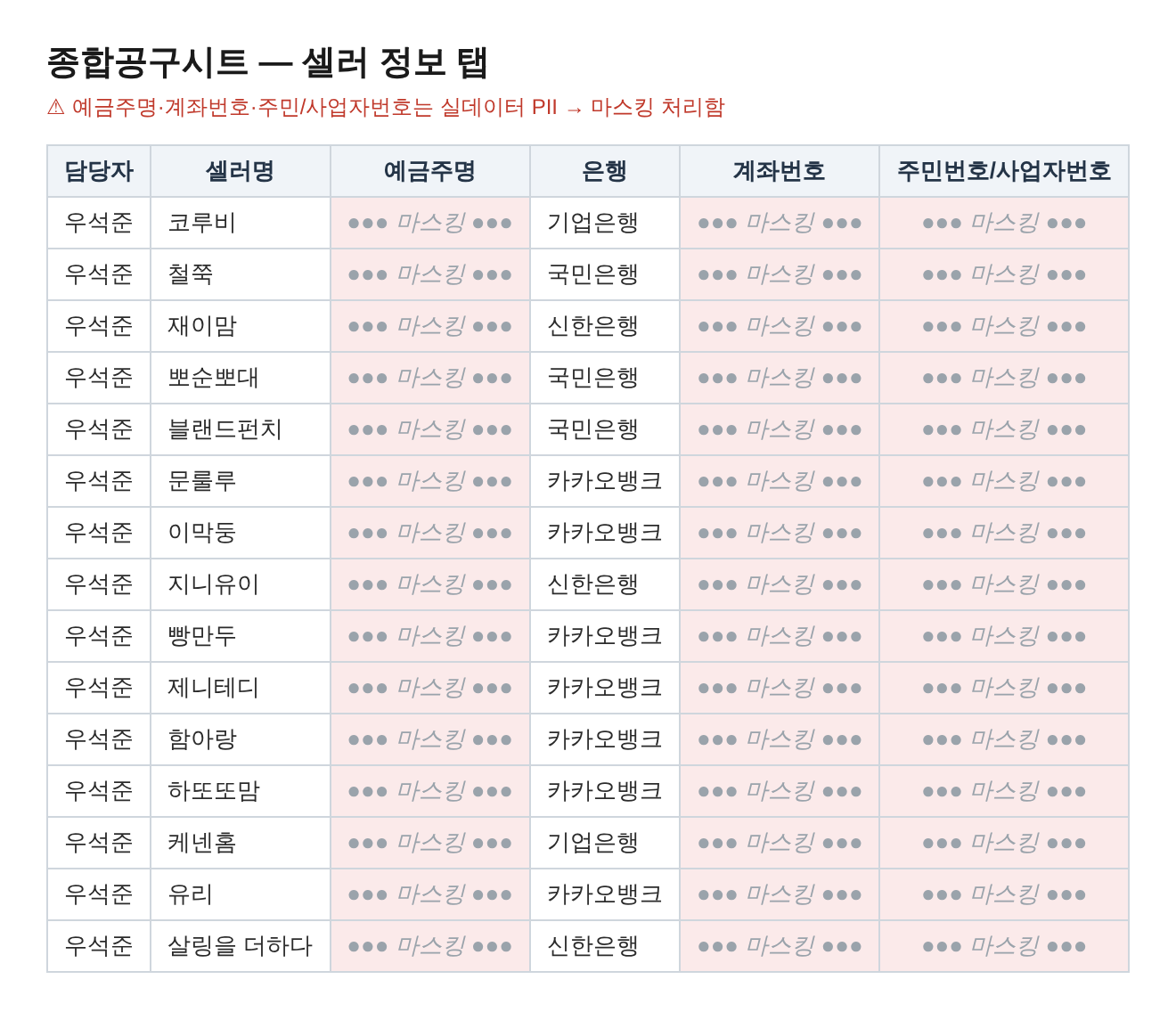
Master group-buy sheet seller info tab — accounts and resident numbers masked
② The master group-buy sheet's seller info tab — the reference data for payees and accounts (accounts and resident numbers masked).
Auto-calculated
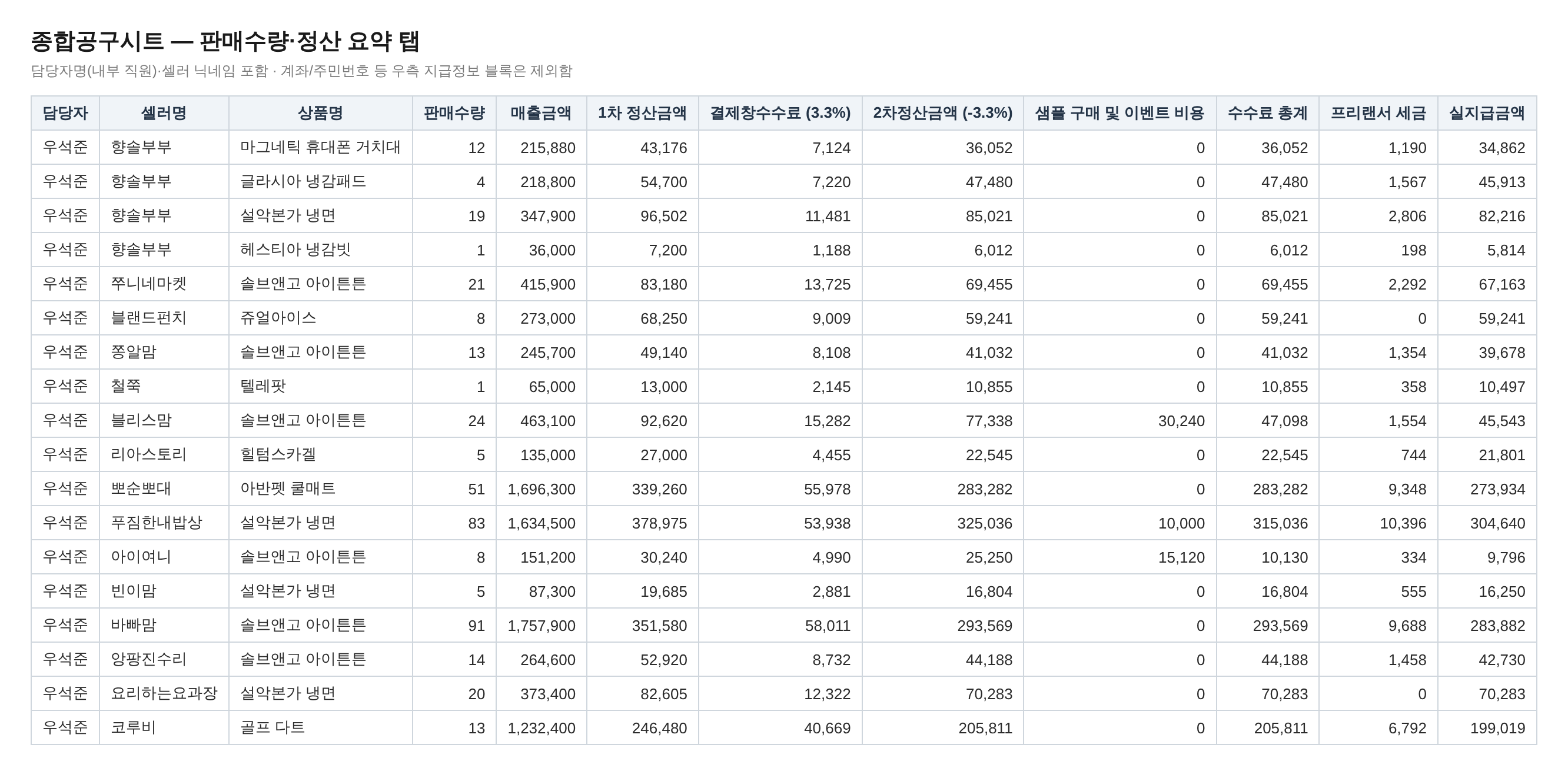
Master group-buy sheet sales quantity / settlement summary tab — quantities and amounts auto-calculated
Sales quantities are keyed in automatically, and the actual payout — with commissions and taxes applied — is auto-calculated too.
Output
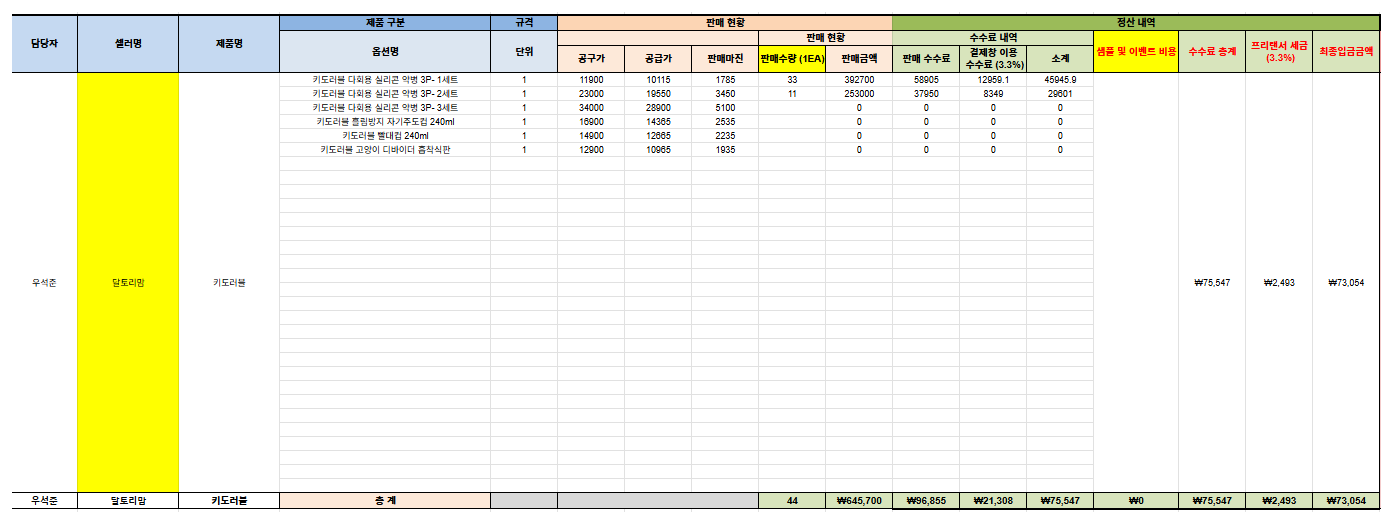
Per-seller settlement statement output example — per-option sales, commission, final deposit amount
④ The individual statement sent to each seller — auto-generated in the same format.
The Impact

Hours of settlement, down to seconds

Repetitive entry, cross-checking, and individual dispatch are gone; the staff just review. (Figures based on Wooha Company's own materials, 100-seller example.)

BEFORE
  • Cross-checking each supplier's different statement by eye and transcribing quantities
  • Building each seller's statement and sending individually over KakaoTalk
  • Typing seller info straight into sheet cells (typo / overwrite risk)
AFTER
  • Upload a file and AI matches sellers and options, keying in quantities (~30 sec for 100)
  • Statements auto-generated and dispatched to all sellers in bulk (~2–3 min)
  • Form input + auto-validation prevents typos and overwrites
Statement processing
30 sec

The 2–3 hours spent cross-checking and transcribing 100 sellers' settlement statements by eye now finishes in about 30 seconds — just by uploading the files.

Next step

Expanding on the back of settlement

We're jointly envisioning an expansion into an all-in-one "domain expert + AI agent" platform — seller sourcing monitoring, a customer-support (CS) chatbot, automated content (shorts) generation, and more.

Tech Stack

Built on a proven stack

The keys are document recognition that reads differently-formatted statements, and matching that finds the same seller and option despite different labels.

Django Claude Vision (statement reading) GPT-4o mini (seller · option matching) Google Sheets · Drive · Gmail API standarda-core LangSmith tracing Vanilla HTML/CSS/JS