FDE Build Project · E-learning

Upload the raw data,
and the payout math is done

We automated CP settlement (instructor revenue share) for the e-learning company Codepresso. Just upload the raw learning data exported from the admin, and the agent applies each contract's rules to calculate payouts and automatically produces four settlement files, each tailored to its recipient.

🏢 Codepresso (E-learning) 👥 Operations · Finance 🧪 Build & validation (pre-production)
~5 hrs/monthRepetitive manual settlement (automation target)
4 rule typesStandard · carry-over · partial · conditional, auto-judged
4 output filesGenerated per recipient automatically
De-identifiedMasked on the client's PC before export

※ Currently in the build & validation stage (pre-production).

The Challenge

A hands-on settlement that comes back every month

The admin export couldn't be used as-is, the rules differed for every contract, and each recipient needed a different file.

1

Raw data full of seconds and timestamps, cleaned up by hand

Study time came out in raw seconds like "8232 seconds" and dates as timestamps, so the staffer had to convert each one into hours/minutes/seconds and readable dates with Excel formulas.

2

Rules differed per contract, making reconciliation painful

Even the same course followed different rules per client (standard, carry-over, partial, conditional). Carry-over settlement especially meant manually reconciling cumulative data against the previous month. Re-enrollments were found by hand too.

3

A separate file edited by hand for every recipient

The client, CP, and finance versions each carried different information and different levels of personal-data exposure, so one ledger was hand-edited into three branches for export.

The Solution

Upload → review → recipient-specific files

The staffer only uploads the ledger. Calculation, rule application, review, and output generation are all handled by the agent.

STEP 1

Upload ledger

Upload the raw admin data; the client is matched automatically.

STEP 2

Auto-apply rules

Four settlement rules, carry-over, and re-enrollment auto-judged.

STEP 3

Review preview

See the actual calculation before finalizing.

STEP 4

Close & confirm

Finalized only after the review step.

STEP 5

Generate 4 files

Settlement files organized per recipient.

Feature ① · Input

Upload messy raw data and it cleans itself up

Upload several ledgers at once (cumulative, past to present) and it matches each client by filename and automatically converts raw seconds and timestamps into a human-readable form.

  • "8232 seconds" → "2h 17m 12s", timestamps → dates, converted automatically
  • Multiple client ledgers uploaded and matched at once
  • Clean learning data with no manual processing
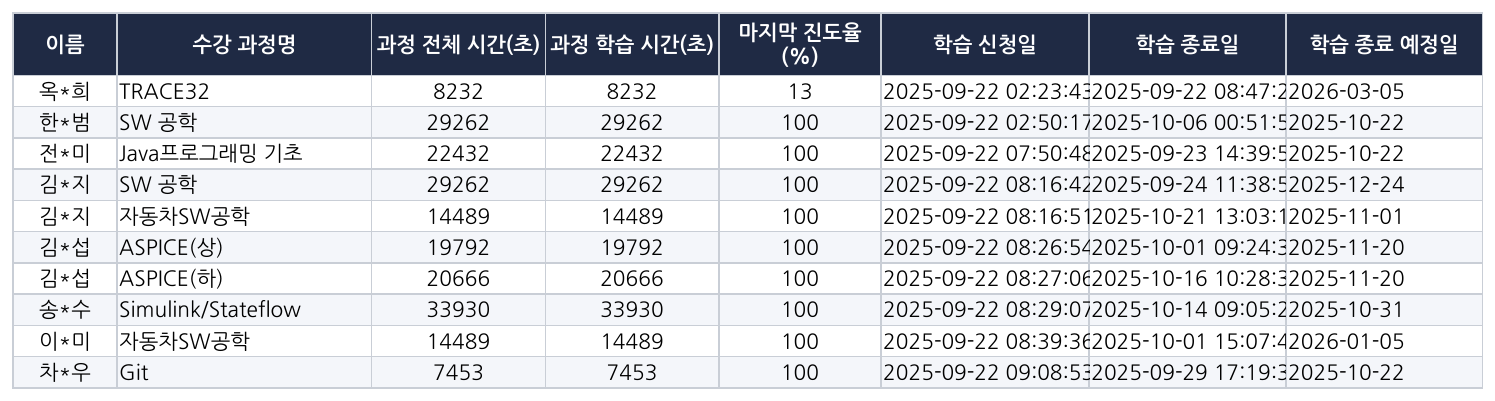
Raw admin settlement data — study time in seconds and timestamps (names masked)
The uploaded ledger: study time in seconds and timestamps (names masked)
Feature ② · Core

Four settlement rules with automatic carry-over and re-enrollment detection

Using progress rate, enrollment date, expected end date, and re-enrollment status, it applies the rule (standard, carry-over, partial 50%, conditional) to every row automatically. The most labor-intensive parts — carry-over reconciliation and re-enrollment detection — are automated.

  • Carry-over items track automatically, inheriting last month's state
  • Re-enrollments detected automatically by email + course name
  • Courses missing from the price/split master are flagged in one batch before the run
Cleaned learning dataProgress · enrollment date · re-enrollment
Automatic rule judgmentStandard · carry-over · partial · conditional
Per-row payoutClient price × CP split rate
Contract-specific rules applied to every row automatically
Feature ③ · Review & output

Check before the money goes out, then four output files

Before finalizing, it shows the exact same calculation on screen (a review preview) and lets you confirm only after that review. Once confirmed, four recipient-specific files are generated automatically.

  • Review total payout, carry-over headcount, and course matching before confirming
  • Four files auto-generated: original ledger / client / CP / finance
  • The CP file masks names, excludes emails, and never mixes in other CPs' data
  • Personal data is de-identified (masked) on the client's PC before export

Auto-generated CP settlement summary (amounts are illustrative dummy values)
A person confirms "this is how much goes out this time" before finalizing.

Because settlement means real money, we designed the numbers on screen to match the finalized file exactly, and made the review step mandatory.

The Impact

Cutting out repetitive processing and reconciliation

Quantified savings will be measured after go-live. Here is what has been structurally resolved so far.

BEFORE
  • Seconds and timestamps converted one by one with Excel formulas
  • Carry-overs and re-enrollments reconciled by hand against the prior month
  • Client, CP, and finance files each edited by hand
  • About 5 hours of repetitive settlement work per month
AFTER
  • One upload converts and cleans everything automatically
  • Carry-overs and re-enrollments auto-judged, 4 rule types applied automatically
  • Four recipient-specific files auto-generated and masked
  • A review preview before confirming prevents mispayments
Settlement rules
4 types

Standard, carry-over, partial, and conditional rules are auto-judged on every row. The most labor-intensive parts — carry-over reconciliation and re-enrollment detection — are now automated.

Status

Built & validated, preparing for production

The settlement engine, master management, review gate, and four output files run on the validation server. The goal is to shrink about 5 hours of monthly manual work down to minutes, and we are preparing production deployment pending the client's infrastructure discussions.

Tech Stack

On a proven stack

The defining choice: separating status judgment — which doesn't need the confidential prices — from the amount calculation that attaches the master, along a code boundary.

Django PostgreSQL pandas (aggregation · pivots) openpyxl · xlsxwriter standarda-core Python de-identification script Vanilla HTML/CSS/JS